


 maibank
 maib business app
 new internet banking - maib business

сurrent accounts
find out more
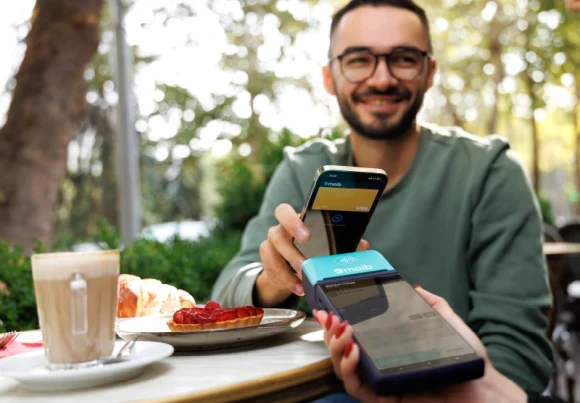
All-in-one smart terminal for sales management and payment acceptance
The device combines a POS terminal, cash register, and digital business management tools into one compact and easy-to-use solution.
Smart ONE runs on the Android operating system, features a 6-inch touchscreen, and includes a built-in thermal printer for issuing fiscal receipts.
The terminal supports Wi-Fi, 4G/LTE, and Bluetooth connectivity, making it suitable for both fixed locations and mobile business operations.
The device supports transaction fiscalization even when offline, with data automatically transmitted once the internet connection is restored.
Benefits
Suitable for:
Retail stores, restaurants and cafés, courier services, taxi services, sales at fairs, exhibitions and events, and mobile businesses.
Accepted payment methods
Bank cards
Accept Visa, Mastercard, and American Express cards.
Card payment acceptance methods
QR MIA payments
Accept payments by scanning the QR code.
Cash
Supports the fiscalization of cash payments when required.
For Smart ONE, both the device and the fiscalization solution are provided by our partner Alex S&E.
To activate fiscalization services, receive technical support, or obtain additional operational information, please contact the partner directly.
Contact:
Note: Fees for fiscalization, connection, and maintenance are determined by the fiscalization partner and should be confirmed directly with them.
The onboarding process starts with maib, while the device is purchased from our partner Alex S&E.
Step 1 — Submit your request
Visit a maib branch and submit your application in person, or complete the online form on our website. Our team will contact you to discuss the details.
Step 2 — Complete the application and prepare the required documents
To apply, please complete the application and provide:
If additional information or documents are required, our team will contact you.
Step 3 — Purchase the device from the partner
After completing the above steps, visit the office of our partner Alex S&E, where you can purchase the SmartOne Bank Pro terminal and all the necessary materials to start accepting payments.
The partner will provide all the information you need regarding device operation, service activation, and fiscalization.
SmartOne Bank Pro is an all-in-one device that combines:
It is a simple and modern solution for businesses that want to accept payments and issue fiscal receipts using a single device.
SmartOne Bank Pro is an all-in-one device that combines:
It is a simple and modern solution for businesses that want to accept payments and issue fiscal receipts using a single device.
SmartOne is suitable for retail stores, restaurants and cafés, courier services, taxi services, sales at fairs, exhibitions and events, as well as other mobile businesses.
Yes. SmartOne can record and fiscalize transactions offline for up to 72 hours. Once the internet connection is restored, fiscal data is transmitted automatically.
The device and fiscalization solution are provided by our partner Alex S&E.
For pricing, configuration, or technical support, please contact the partner directly.
To sign the agreement with the bank, the following documents may be required:
The process is simple:
According to the agreement, the bank reserves up to 30 days to install and activate the terminal. In practice, the process usually takes approximately 7–10 days.
Payments accepted through the POS terminal are transferred to the company's account on the next business day after the terminal's business day has been closed.
You can accept electronic meal vouchers (EMVs), participate in the maib liber programme, or offer cashback to your customers.
For more information, call 1314 – maib Contact Center.
A payment can be refunded directly from the terminal.
Open the POS terminal user guide and follow the steps in the "Refund" section to process the refund.
Thank you for your request
Your application has been added to the processing queue. Our team will contact you shortly with further details
You have initiated the contract signing process
A member of our team will contact you Monday to Friday, between 09:00–17:00
Thank you for choosing maib!